
KultureCity
KultureCityParenting
4.657.00 Reviews
- Version
- 6.2.2
- Installs
- 10.00K
- Age Rating
- Everyone
Screenshots
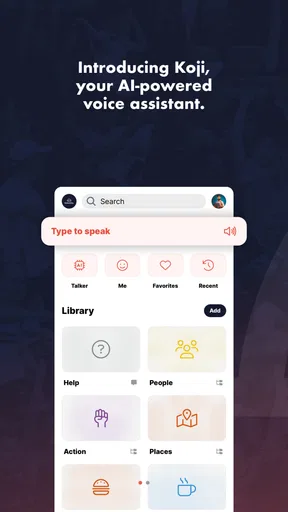
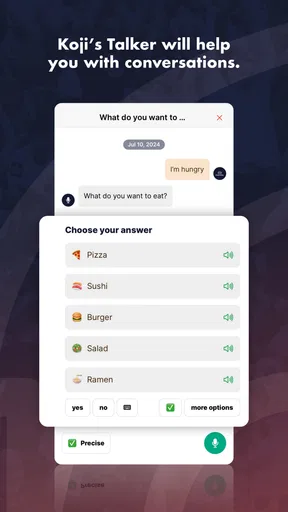
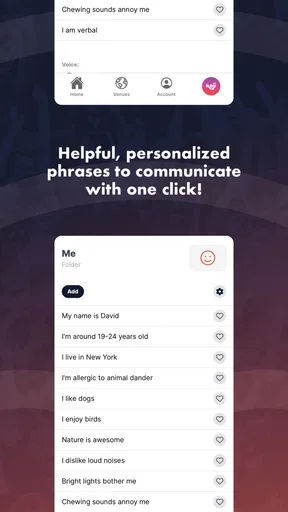
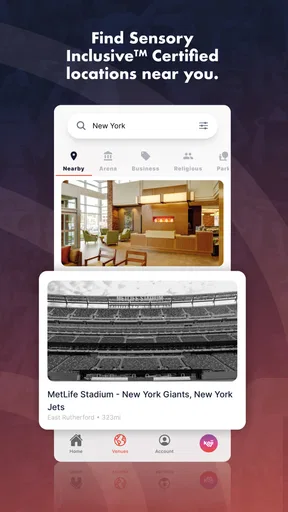
Our Review of KultureCity
 Analysis by Appyee
I approached KultureCity as a practical parenting app rather than something to browse casually. Its purpose is unusual: it is presented as an AI talker and conversation app, and the idea is to give people a free way to support communication. That makes it especially interesting for families looking for an accessible communication aid, although it also means expectations need to be realistic. This is not a general social network, a child-monitoring dashboard, or a replacement for professional support. It is a focused tool from KultureCity that deserves to be judged by how useful it feels during real moments when speaking or starting a conversation is difficult.
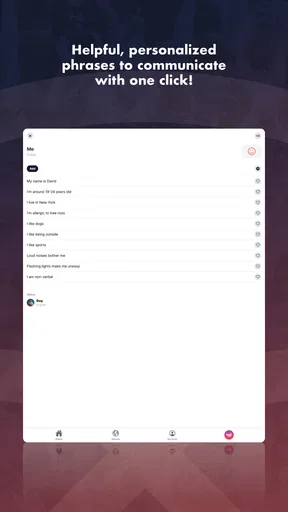
My first impression is that the app’s value depends less on entertainment and more on preparation. A parent, caregiver, teacher, or family member can treat it as one part of a communication routine: something to open before an outing, keep available during a stressful situation, or use to make a child’s needs easier to express. That practical role is where the app makes the strongest case for itself. The best way to use KultureCity is as a ready-to-use communication bridge, not as a magic solution.
How KultureCity fits into everyday communication
In the parenting category, many apps focus on schedules, learning activities, safety, or entertainment. KultureCity takes a different path by concentrating on talking and conversation. That distinction matters. A parent who only wants games or educational exercises will probably find the app too specialized, while a family trying to make communication more manageable may appreciate its direct purpose.
A realistic example would be preparing for a busy public place. Before leaving home, I would open the app with the child and identify the messages that might be useful during the outing. These could relate to needing a break, feeling uncomfortable, asking for help, or wanting to leave. The important part is doing this while everyone is calm. When the environment becomes noisy or overwhelming, the child should not have to learn the interface from scratch.
That preparation-first approach is one of the less obvious strengths of an app like this. Communication tools are often judged by what happens in a crisis, but the quality of the earlier routine can determine whether they work under pressure. I would spend time letting the child explore the app without demanding an immediate response. A familiar sequence is more valuable than a large collection of unused possibilities.
The app is free, which removes one of the biggest barriers for families who want to test a communication aid before committing money. It is also rated for Everyone, making its intended audience broad. That does not mean every child will find it equally easy or suitable. Age ratings describe general content suitability, not individual communication needs, motor skills, reading ability, or comfort with technology.
KultureCity has reached over ten thousand installs and holds a 4.6 average from around one hundred sixty ratings. Those figures suggest that the people who have rated it generally respond positively, but I would still treat them as a starting point rather than proof that it will fit every household. Communication tools are highly personal. A design that works well for one child may feel slow, confusing, or too limited for another.
What the current version tells me about the product
The current version is 6.2.2, and that is useful context when thinking about the app’s present state. It shows that this is not simply an abandoned experiment left untouched after its original release. The app first appeared on April 5, 2018, so its current form sits within a product that has had time to develop rather than arriving as a brand-new concept.
I would not interpret the version number alone as evidence that every important need has been solved. Updates can improve stability, presentation, compatibility, or internal behavior without changing the central experience. For a communication app, the details that matter most are still very personal: how quickly a user can reach a desired message, whether the interaction feels comfortable, and whether a caregiver can support it without taking over.
The minimum operating system is Android 6.0. That makes the app potentially useful on older Android devices, which can be important when a family has a spare phone or tablet available for communication. At the same time, older hardware may not provide the smoothest experience. I would test the app on the actual device that will be carried or handed to the child, rather than assuming that compatibility automatically means convenience.
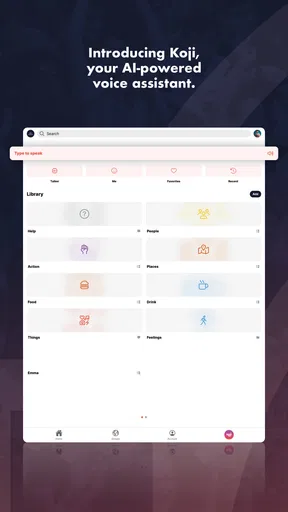
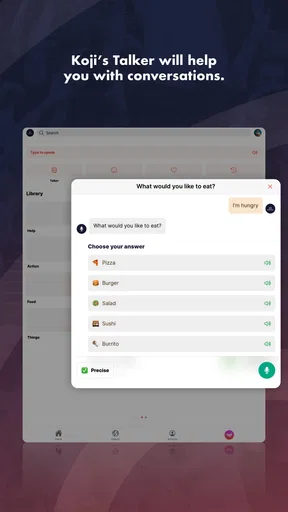
The store summary describes KultureCity as the world’s first AI talker and conversation app and emphasizes that it is free. I see that wording as an indication of the app’s ambition, not a guarantee that it will replace every established communication method. The practical question is simpler: can the person using it communicate more comfortably and independently with this particular interface?
How the app can help existing users after an update
For someone already using an earlier version, the move to 6.2.2 is most relevant if the app now behaves more reliably on the device they depend on. Existing users should approach any update carefully: open the app when there is no immediate need, check that familiar communication routines still feel natural, and make sure the child or dependent adult can still reach important choices without unnecessary changes.
This is especially important when a tool has become part of a daily pattern. A small interface adjustment can have a larger effect than it would in an ordinary app. If a user relies on muscle memory, visual order, or a caregiver’s established prompts, even a modest change may require practice. I would never install an update for the first time minutes before a crowded event or a difficult appointment.
A sensible workflow is to keep the previous routine in mind while testing the current release. Try the most common requests first, then test a less frequent but important situation, such as asking for a pause or getting assistance. If the app is being used by a child, let them lead the test wherever possible. The goal is not merely to confirm that the app opens; it is to confirm that the person can use it with the least possible stress.
Another useful habit is to involve more than one caregiver. Parents may understand the intended communication pattern, while teachers, relatives, or support workers may encounter different situations. Showing them how the app is used prevents the device from becoming a mysterious object that only one person knows how to operate. It also helps adults respond to the communication instead of repeatedly asking the child to explain it in another way.
Specific situations where I would recommend trying it
I would consider KultureCity for families who want a free starting point for assisted communication and are willing to practice together. It may be useful before travel, during appointments, on school days, or in public environments where speaking becomes harder. The app can also be helpful as a backup on a dedicated older device, provided that the device is charged, easy to reach, and familiar to the user.
One concrete strategy is to create a short “high-pressure” practice session at home. Instead of exploring every option, choose a few messages that matter most during discomfort or confusion. Practice opening the app, selecting the message, and waiting for the caregiver’s response. This teaches the whole interaction, not just the button press. It also reveals whether the app is genuinely accessible for the user or whether the adult is doing most of the work.
A second strategy is to use it during low-stakes conversations before relying on it in a demanding setting. A child might use it to indicate a preference between two snacks, request a toy, or signal that they want quiet time. These small moments help the family learn whether the communication flow feels natural. They also give the user a chance to experience success without the pressure of an emergency.
A third insight is that the phone or tablet should be treated as part of the communication setup, not as an afterthought. Screen brightness, sound, battery level, case design, and where the device is stored can all affect access. I would choose a consistent location and make sure the device is not buried in a parent’s bag when the child needs it. The app may be free, but the surrounding routine still determines how dependable it feels.
There is also a social benefit to explaining the tool briefly to trusted adults. A teacher or family member who understands that the app is a communication aid is less likely to interpret device use as distraction. This can make the experience more respectful. The app cannot control how other people react, but preparation can reduce awkwardness and prevent the user from being pressured to communicate in only one way.
Where it may not be the right choice
I would not recommend relying on KultureCity as the only communication method for a person with complex, changing, or urgent needs without first discussing the setup with an appropriate professional. A general-purpose app may be a useful supplement, but it may not provide the depth, personalization, vocabulary, or access method required by someone who depends on a comprehensive augmentative and alternative communication system.
It may also be a poor fit for a user who cannot comfortably operate the device. If selecting an option requires too much precision, if the screen is difficult to see, or if the user becomes distressed by the interaction, the app could create more friction than support. In that situation, a different tool, a customized system, or a non-digital communication method may be better.
Families looking for detailed progress tracking, structured lessons, or a broad parenting organizer should also look elsewhere. KultureCity’s appeal comes from its communication focus, not from trying to cover every part of family life. Comparing it with ordinary parenting apps is therefore slightly misleading; the more relevant comparison is with picture-based communication, printed cards, speech-generating tools, and specialized AAC software.
Compared with printed cards, the app is easier to carry and may feel more adaptable, but it depends on a charged electronic device. Compared with a specialized AAC platform, it may be less tailored to an individual communication system, even though it is easier to try without a financial commitment. Compared with simply asking a child to speak, it offers another route when speech is unavailable or difficult, but it still requires the environment and the people around the user to respect that route.
Practical questions to consider before depending on it
A parent will naturally wonder whether the app is suitable for a young child. The Everyone rating makes it broadly appropriate from a content perspective, but suitability still depends on the child’s communication style and ability to interact with the device. I would introduce it gradually, observe whether the child shows understanding and interest, and avoid turning every use into a test.
Another question is whether it can replace professional advice. In my view, it should not be treated that way. A free app can be an accessible experiment or a helpful addition, but professional guidance is important when communication needs are significant. A specialist can help determine whether the app supports the person’s goals or whether another approach would offer better access and independence.
Users may also ask whether an older Android phone is enough. Since the minimum operating system is Android 6.0, the app can work with a relatively old Android platform, but the actual experience will depend on the device. I would test touch response, screen visibility, audio, and battery behavior before taking it outside. A device that technically runs the app may still be inconvenient if it is slow or difficult to hold.
For someone already familiar with the app, the sensible question is whether updating is worth it. Because the current release is 6.2.2, I would keep it updated when possible, but I would test the updated experience before an important outing. Preserve the user’s familiar practice routine, and do not assume that a new version automatically improves every personal workflow.
What I would watch as the product continues
The next stage of KultureCity should be judged by how well it supports independence, not simply by how many capabilities it adds. I would watch for improvements that make communication faster to access, easier to personalize, and less dependent on a caregiver’s intervention. Those changes would matter more to me than a longer feature list that makes the interface harder to understand.
I would also pay attention to how the app handles the balance between simplicity and flexibility. A very simple tool can be approachable but restrictive. A highly flexible tool can support more situations but overwhelm the person who needs it. The strongest direction would preserve a calm, clear experience while giving families enough control to match the user’s real communication habits.
Reliability should remain central as well. A communication aid is judged in ordinary moments, but its value becomes clearest when the user is tired, anxious, overstimulated, or somewhere unfamiliar. Consistent access, predictable interaction, and a workflow that caregivers can teach easily are the qualities I would want to see protected as the app evolves.
My overall view is positive but measured. KultureCity is an unusually focused free parenting app from KultureCity, and its AI talker and conversation concept gives families a reason to try it without a large financial risk. The 4.6 average and more than ten thousand installs show that it has found an audience, while the current 6.2.2 release indicates an established product rather than a one-off listing.
I would recommend downloading it for a calm trial, building a small communication routine, and testing it on the device that will actually be used. I would not promise that it will suit every child or replace a specialized system. For the right family, though, it can provide a practical extra voice when ordinary conversation is not working. Its real strength is not replacing human support; it is helping that support become easier to understand and respond to.
Verdict
Strengths of KultureCity
- Helps users identify sensory-inclusive venues before attending events.
- Venue information can make planning trips easier for people with sensory needs.
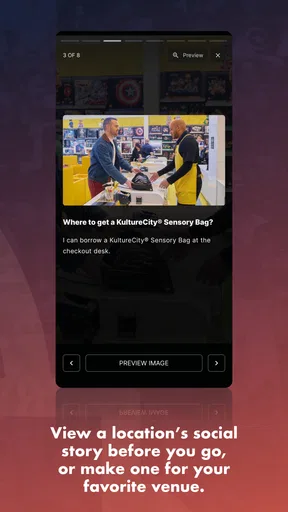
- Includes details about available sensory bags and quiet areas at supported locations.
- Useful for families, caregivers, and individuals seeking more accessible experiences.
- Free to download and simple to browse by location or venue.
Limitations of KultureCity
- Coverage depends on participating venues and may be limited in some regions.
- Venue details can become outdated if event accessibility information changes.
- Some listings may offer limited information beyond basic sensory features.
- Requires location access or manual searching to find nearby participating venues.
- The app cannot guarantee that accessibility accommodations will be available on arrival.
Similar Picks in This Category
View All
Family Space
Motorola Mobility LLC.3.9

شرطة الأطفال - مكالمة وهمية
Oub Apps4.1

Findmykids: Parental Control
LETEM LTD4.6

Pregnancy + | Tracker App
Philips Electronics UK Limited4.8

Policía de niños - para padres
Kids police4.7

Pregnancy App
Amila4.9
Frequently Asked Questions
What is KultureCity, and what is the app used for?
KultureCity is an accessibility-focused app designed to help people with sensory needs find and prepare for more inclusive experiences. It can provide information about sensory-inclusive venues and events, including available accommodations, accessibility resources, and practical guidance. The app is especially useful for families, caregivers, and individuals who want to understand what support may be available before visiting a public place.
How can KultureCity help me prepare for an event or venue visit?
Before attending an event, KultureCity can help you review venue accessibility information and learn about sensory-inclusive services that may be available. Depending on the location, this may include details about quiet areas, sensory bags, trained staff, or other accommodations. Checking the app in advance can make planning easier and help visitors know what to expect when they arrive.
Does KultureCity provide sensory bags or other accessibility equipment?
KultureCity is associated with sensory-inclusive initiatives that may include sensory bags containing items such as noise-reducing headphones, fidget tools, and verbal cue cards. Availability depends on the participating venue, event, and local program policies. The app can help users identify locations offering these resources, but it is recommended to confirm current availability directly with the venue before visiting.
Is KultureCity useful for people with autism or other sensory sensitivities?
Yes. KultureCity is intended to support people who may experience sensory sensitivities, including some individuals with autism, ADHD, PTSD, dementia, or other conditions. Its information can help users identify more accommodating venues and plan visits with greater confidence. However, needs vary from person to person, so the app should be considered a planning resource rather than a replacement for individualized medical or accessibility advice.
Is KultureCity free to download, and does it require an account?
The KultureCity app may be available to download without an upfront charge, although specific features, account requirements, and availability can change between Android and iOS versions. Some information may be accessible without signing in, while personalized tools or event-related features could require additional details. Before downloading, review the current store listing, permissions, privacy information, and any applicable terms.
